Setting Entry Fees
Entry fees determine what a participant pays and, for Standard Checkout, the amount expected to reach the organizer after the displayed fees, tax, and statutory deductions.
Choose A Registration Mode
For new activities:
- choose Free when participants do not pay;
- choose Standard Checkout when participants pay online through Xfitconnect; or
- for an enabled Challenge, choose Approval Only when participants request organizer approval and Xfitconnect does not collect participant money. Contact Xfitconnect support to have this mode enabled and priced for an eligible club. Its per-participant hosting fee is paid upfront.
Existing activities may retain an older organizer-managed payment mode. Those saved modes remain supportable but are not ordinary choices for new activity authoring.
Review The Amount
Before publishing:
- confirm the entry fee for every package or Event category;
- select the correct GST treatment;
- check whether discounts are available;
- review fees, tax, statutory deductions, and expected payout; and
- test the participant flow.
Standard Checkout shows the technology fee, applicable GST and statutory deductions, and estimated organizer payout. Payment processing is included in the Xfitconnect technology fee.
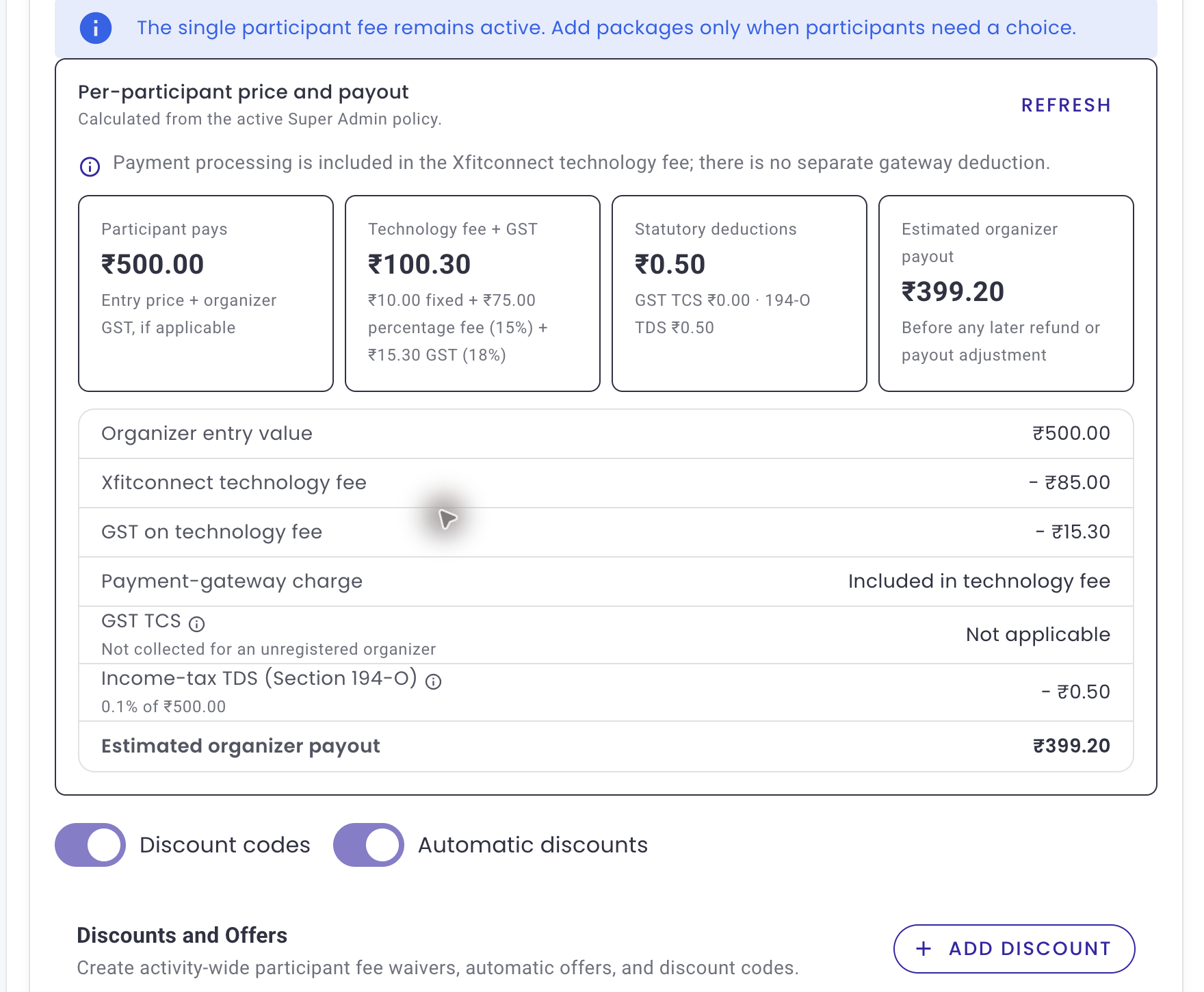
Understand The Pricing Breakdown
- Participant pays is the checkout total before a later refund.
- Organizer entry value is the activity value attributable to the organizer.
- Organizer GST appears only when the organizer is GST registered and the saved tax treatment requires it.
- Xfitconnect technology fee is shown as a concrete amount calculated from the active policy.
- GST on the technology fee applies to Xfitconnect’s service fee even when the organizer is not GST registered.
- Statutory deductions are shown where the applicable marketplace tax rules require withholding.
- Estimated organizer payout is the remaining amount before a later refund, recovery, or payout adjustment.
Use the information icon beside a deduction to read its purpose. Amounts withheld for the organizer are recorded for the applicable reporting and filing workflow; they are not an additional Xfitconnect earning.
Choose GST Inclusive Or Exclusive
If the organizer is GST registered, choose the treatment that matches the advertised price:
- GST included means the participant sees one price and the organizer GST is carved out of it.
- GST extra means the applicable organizer GST is added to the entered base price.
If the organizer is not GST registered, organizer GST is not added to the participation value. GST on Xfitconnect’s technology fee still applies because it is a separate service supplied by Xfitconnect.
The organizer is responsible for declaring the correct GST registration status and pricing treatment. Correct the verified organizer profile before publishing if the declaration is wrong.
Price From A Target Payout
Use Calculate from your target payout when you know the approximate amount the organizer should receive per participant. Enter the target and review the suggested participant price and complete breakdown. The helper is an estimate under the active policy; save the participant price only after checking the displayed GST and deductions.
Packages And Categories
A Challenge may offer participant packages such as participation only or participation with merchandise. An Event may price each category. Each option is sold as the complete package displayed to the participant; do not imply a separate refundable value for an inclusion unless the terms say so.
Hide an option when it should no longer accept new registrations. Existing orders keep the package or category purchased. Activity-level discounts follow the saved discount rules across eligible options unless the editor explicitly offers a narrower scope.
Choose The Participant Refund Rule
The default for a new club is Refund request within 24 hours of payment. A participant may submit
the request only until the earlier of:
- 24 hours after successful payment
- the Event or Challenge start time
After that point there is no participant-initiated refund. You must approve or reject an eligible request in Xfitconnect. An approved individual withdrawal or organizer-initiated refund returns only the organizer allocation; the Xfitconnect technology fee, which includes payment processing, and applicable GST are retained.
You may instead choose No participant cancellation or refund. The selected rule, estimated refund,
and applicable terms are shown to the participant before payment and frozen with the order.
Cancellation of the entire Event or Challenge is different: the complete captured participant payment is refunded. Where a refundable organizer cancellation security deposit applies, it may be used only for that whole-activity cancellation, never for an individual withdrawal or goodwill refund. Insufficient cancellation cover does not stop new registrations. If cancellation later creates an amount due from you, eligible held or future payouts may be used before any remaining funding is requested from you.
Changing A Price After Publication
A saved price change applies only to eligible new registrations. Existing paid orders retain their package or category, price, discount, tax, seller, and refund terms. Before changing a live price, preview the participant flow and communicate the effective date clearly; never edit a price to try to rewrite an earlier order.